Title Tag creator
Create SEO-friendly Title tags with our AI powered Title Tag generator and improve your visibility in search. Title tags are for both users and search engines very important to quickly understand what a page is about.
How does the Title tag Generator work?
- Enter a short summary of your page or paste the first few paragraphs.
- Optional: provide advanced instructions (Keywords, Tone of voice, … )
- Hit the “Start creating content” button.
- The tool will automatically generate 10 Title Tag options for you to choose from.
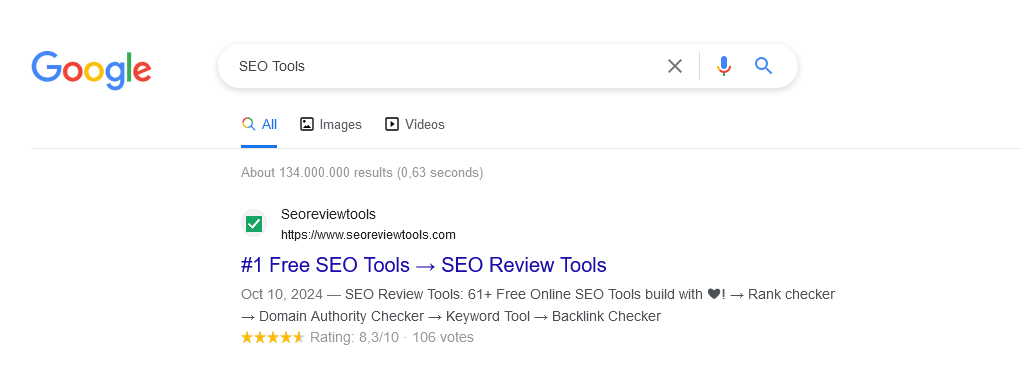
Title tag example


The above example shows a simplified part of the search snippet. The title tag usually appears above the page description in the search engine results page (SERP).
Search snippet preview
Use our Google SERP Preview Tool to instantly visualize how your title tag will appear in search results.
Google documentation and resources
- Influencing your title links in search results. Learn more ⇉
- How title links in Google Search are created? Learn more ⇉
- How to change my Google Search result snippet? Learn more (Video) ⇉
Related FAQs
How do I write an effective Title tag?
An effective title tag should be concise, descriptive, and engaging. It should clearly communicate what the page is about and encourage users to click on the link.
How long should a Title tag be?
Ideally, title tags should be between 50-60 characters to avoid truncation in search results while remaining concise and relevant to the page content.
Does Google always use my Title tag in search results?
Not always. Google may modify or replace your title tag based on the content of the page, user queries, or other factors if it believes the title doesn’t fully match the search intent.
Where do title tags appear?
Title tags appear in three main places: search engine results pages (SERPs), browser tabs, and when a page is shared on social media.
Tip: Learn how to → Optimize AI content for SEO
HTML Title tag example
The HTML <title> tag is used to define the title of a web page, view the code example below.
<title>Relevant page title</title>Related SEO tools, Resources & APIs
- How to write SEO optimized Title tags? (Resource)
- Keyword Research Tool (Tool)
- SEO Content optimization (API) (API)
- Bulk Title tag checker (Tool)
- Google SERP preview Tool (Tool)


































 Get the new Chrome Extension!
 Chrome extension